
The elevated LIBOR homepage is officially live!
Take a look around and check out all the exciting changes and improvements we’ve made.
Five Biggest Security Risks for REALTORS®
Real estate fraud took $275 million from 12,368 people last year, and almost none of it needed a single line of code. It just needed one person who was in a rush.
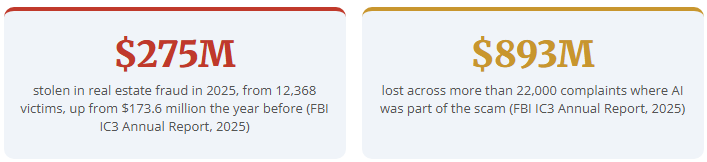
The $275 million total was 59% higher than the previous year. Unfortunately, AI technology is partly responsible for the increase. The identifiers of a scam you were used to (like bad grammar, missing punctuation and weird logos) are now mostly gone and replaced by more sophisticated attacks. Let’s take a closer look at the five biggest threats to your business and the steps you can take to avoid them.
1. Phishing That Actually Reads Well
Reported losses to phishing and spoofing tripled last year, from $70 million in 2024 to $215.8 million in 2025 across 72,984 complaints (FBI IC3). AI writes clean English now. It copies a signature block, matches a tone, and references a real address because the listing is public. Scammers are now also including legitimate links, Zoom meetings and calendar invites in their targeted communications.
What to do now: Check the actual sender address of the email, not the display name. Treat any email that changes where money goes, or has a link that prompts you to log in, as unverified until you've called a number you have on file.
2. The Voice on the Phone Might Not Be a Person
The FBI has documented voice cloning used to request wire payments, and it doesn't take much source audio or much work to do it. Your voice is on your voicemail greeting, your listing videos and your social posts.
This is the one that is most worrisome because it defeats the instructions you've spent years hearing: "call to confirm." This stops being effective when the voice that answers is not real.
What to do now: Set a code word with your title company and with each client at the start of the transaction. One word, agreed in person or on a call you started. No code word, no wire. And always dial the number from your own records, never the one in a voicemail or email.
3. QR Codes Are Links You Can't Read
Microsoft analyzed 8.3 billion email threats in the first quarter of 2026 (yes, that's billion with a "B" and only in three months' time) and found QR code phishing up 146%, with roughly 18.7 million cases in March alone. QR code scams work because the destination is hidden behind the image. Anyone can slap a QR code sticker on your for-sale signs, open house signs, open house sheets, mailers or flyers.
What to do now: Be aware of any QR code that leads to a payment, a login, or requests a document signature. Close it and type the address yourself. Inspect your own signage for stickers that shouldn't be there.
4. Hotel and Conference Wi-Fi Is a Target
Since June 2026, security researchers at ReliaQuest have found attackers with administrative control of the Wi-Fi at hotels and conference venues across multiple US cities. They redirect guests to fake Microsoft 365 sign-in pages and collect the passwords. The victims are almost always traveling professionals at conferences or large events. Innocently connecting to a free Wi-Fi network to reply to an urgent client email can make you a victim.
What to do now: Use your phone's hotspot for anything involving email or money. If a Wi-Fi network asks you to sign into Google or Microsoft 365 to connect, do not enter your credentials. Disconnect.
5. Don't Overshare with Your AI Tools
More than half of workers (52%) use AI tools their company hasn't approved, and more than 1 in 5 of those admit to sharing logins and passwords with them (Okta, AI Agents at Work 2026). The same survey reported that people upload confidential documents, contracts and financials.
It is also important to be aware of the privacy and security concerns around AI. AI tools are not private vaults, so any passwords, personally identifiable information, financial records and the like should not be fed into it.
What to do now: Never share something with an AI tool that you wouldn't post publicly. No passwords, no Social Security numbers, no bank details, no signed contracts. Remove names and addresses before you paste.
Five Additional Steps You Can Take to Protect Yourself Online
1. Turn on multi-factor authentication everywhere you can
Microsoft's own research puts the risk reduction at 99.22% when MFA is enabled. It's the single highest-value thing on this list, and it takes about two minutes per account. Start with your email, then MLS, your CRM software and continue until you have gone through the apps you use every day.
2. Agree on a code word with your title company
Do it once and use it on every file. It's the only defense that still works when the voice sounds right.
3. Verify wire instructions by voice, on a number you looked up yourself
Never use the number in the email. Never use the number a caller gives you. Wires move in minutes and rarely come back.
4. Run your updates
Phones, laptops, tablets, browsers. Most of what gets exploited was patched months ago. No one hates the downtime of a reboot more than us, but it is necessary. Restart the device so the update actually finishes.
5. Tell your clients what you will never do
Say it in your intro email: "I will never send you wire instructions by email, and I'll never change them at the last minute." A warning like this can stop more fraud than any software.
If you think you've sent a wire to the wrong place, call your bank within the hour and ask for a recall, then file a complaint with the FBI's IC3 at ic3.gov.
For more information about how to stay safe online and secure your business, visit CISA.
- Tech Tip
Privacy Policy |
Terms of Use |
DMCA Notice |
Accessibility | Translations
1305 Walt Whitman Road, Suite 310, Melville, New York 11747
Phone: (631) 661-4800
© Long Island Board of Realtors, Inc. All Rights Reserved.
LIBOR’s governing documents, conflict of interest policy and financial statements (including IRS Form 990) are available for inspection during regular business hours upon request by appointment.
Web Design & Development by Matrix Group International, Inc.

Privacy Policy |
Terms of Use |
DMCA Notice |
Accessibility
1305 Walt Whitman Road, Suite 310, Melville, New York 11747
Phone: (631) 661-4800
© 2023 Long Island Board of Realtors, Inc.
All Rights Reserved.
Web Design & Development by
Matrix Group International, Inc.